
Table of Contents
What Is RecCloud and Why Is It Popular in 2025?
RecCloud is an all-in-one online platform that offers free cloud storage, screen recording and, all tools in one space powered by Artificial Intelligence. In 2025, it has become hugely popular as a result of the demand for users to have fast, simple and free tools available to them without downloads– RecCloud does that! The platform lets you save files online, record screens from your browser directly, and use advanced AI features like transcription and file conversion.
RecCloud Features
RecCloud offers a powerful set of features designed to simplify storage, recording, and productivity tasks—all in one platform. Whether you’re a student, creator, or business owner, RecCloud provides tools that are easy to use, cloud-based, and completely accessible across devices.
1. Free Cloud Storage
RecCloud gives users generous free cloud storage, making it a great alternative to paid platforms. You can upload files, organize folders, and access your content from any device with no complicated setup.
2. Online Screen Recorder
One of the standout features of This platform is its built-in screen recording tool. It allows you to record your screen directly from your browser without downloading software. You can record tutorials, gameplay, presentations, or meetings in just a few clicks.
3. AI Video Tools
This platform also integrates AI-powered features such as automatic subtitles, audio transcription, and video enhancement. These tools help creators save time and produce polished content faster.
4. Secure Storage & File Sharing
All files stored on This platform are protected with strong security measures. You can share files or videos instantly through links, making collaboration smooth and secure.
5. Cross-Device Access
Because This platform is cloud-based, you can log in from your phone, tablet, or laptop and find all your recordings and files synced automatically.
6. Simple, User-Friendly Dashboard
The interface is clean and intuitive, allowing beginners to navigate easily. Uploading files, editing recordings, and managing storage is straightforward, even for non-technical users.
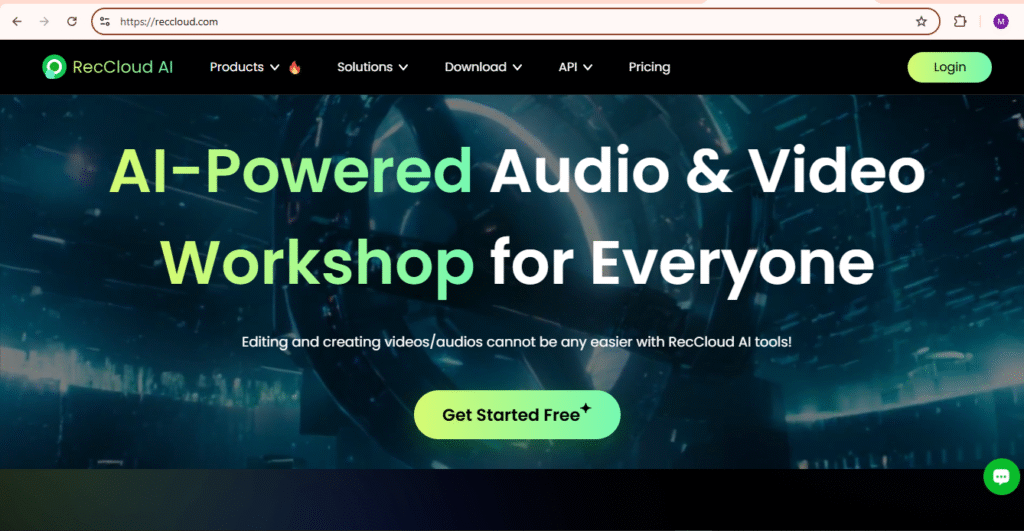
How to Use RecCloud for Free Cloud Storage in 2025
Using This platform for free cloud storage in 2025 is simple, making it a great option for beginners, students, and professionals who need fast and reliable file management. The platform offers generous free storage, smooth uploading, and easy access across devices—all without complicated setup.
1. Create Your Free RecCloud Account
To get started, visit the This platform website and sign up with your email or Google account. The setup takes less than a minute and immediately gives you access to all free features.
2. Upload Files to RecCloud
Once logged in, you can upload documents, videos, images, recordings, and more by clicking the Upload button or dragging files directly into your cloud dashboard. RecCloud processes uploads quickly, even for large files.
3. Organize Your Storage Easily
This platform makes it easy to sort files into folders, rename uploads, or categorize content for better organization. This is especially helpful if you store screen recordings, work files, or AI-generated content.
4. Access Your Files Anywhere
Because This platform is cloud-based, you can access your stored files from any device—laptop, tablet, or phone. All files remain synced across your account, making it a great tool for remote work and content creation teams.
5. Share Files Instantly
This platform allows you to generate shareable links with one click. You can send files to clients, friends, or teammates without downloading anything.
6. Use Additional Tools Inside RecCloud
Beyond cloud storage, you can use integrated tools like the screen recorder and AI features directly within your account—saving time and keeping everything in one place.
Using This platform for cloud storage in 2025 gives you a fast, free, and user-friendly way to manage your files while accessing powerful extra tools on the same platform.
RecCloud vs Competitors
When comparing This platform to other popular cloud storage and screen-recording platforms, it stands out for offering multiple tools in one place—cloud storage, screen recording, AI features, file sharing, and more. Many competitors only focus on one main function and often limit free features. RecCloud combines everything into a single platform, making it an efficient choice for users who want an all-in-one solution without high monthly costs.
Below is a quick comparison to show how This platform stacks up against major competitors in 2025:
RecCloud vs Competitors: Comparison Table:
| Feature / Tool | RecCloud | Google Drive | Dropbox | Loom | OneDrive |
|---|---|---|---|---|---|
| Cloud Storage | Yes (Free & Paid) | Yes | Yes | No | Yes |
| Screen Recording | Yes (Built-in) | No | No | Yes | No |
| AI Tools | Yes (Transcription, Summaries, More) | No | No | Limited | No |
| Free Storage | Up to 10GB (varies) | 15GB | 2GB | Very limited | 5GB |
| Download/Share Tools | Yes | Yes | Yes | Yes | Yes |
| All-in-One Platform | Yes | No | No | No | No |
| Best For | Free screen recording + storage | File storage | Business storage | Video messaging | Windows users |
Pros and Cons of Using RecCloud in 2025
When considering whether This platform is appropriate for you, you’ll want to weigh the pros and cons. Below is the breakdown to help you make the best decision.
Pros of RecCloud
- Free Cloud Storage
This platform has an ample amount of free cloud storage. If you are looking to place files on the cloud, This platform may be a great option for you, especially since you will not be paying monthly for online storage. - Built-In Screen Recording Tool
This platform has a complete screen recorder built in to the platform. It supports screen capture, audio capture and webcam capture from your browser. Many platforms don’t have features like this. - AI-Powered Tools
This platform has AI tools such as automated transcription, file organization and smart search to help you produce quickly and improve productivity. - Simple and Not Complicated for Those Who aren’t Tech Savvy
This platform is a simple and minimal looking application which can be beneficial to those who do not enjoy or are not familiar with technology. - Works Anywhere
This platform is completely cloud-based, which means you can upload, manage and access your files from any device, anywhere.
Cons of RecCloud
- Limited Space for Free Users
The free storage option, while useful, will not provide you with enough storage if you need to work on larger video files or projects that span a longer period of time. - Internet Required
As This platform is cloud-based, you’ll need a good internet connection to upload, download, or record successfully. - Limited advanced editing
This platform allows for recording and storage, but does not provide the advanced video editing capabilities that some of its competitors do. - Upload processing time
If you are uploading a large file, it may take some time to process before you can view it depending on both the server speed and your internet speed.
Final Verdict
After reviewing the features and capabilities of This platform, This platform definitely ranks among the most versatile free tools available in 2025. It has the integrations of cloud storage, screen recording, and even AI-driven features – a seamless experience for students, professionals, and content creators.
This platform offering a user-friendly interface and reliability, with no download makes it easy to use for novice users, while power users benefit from advanced features. Return This platform provides a unique all-in-one solution that saves time and streamlines workflow over alternatives like Loom or Google Drive.
Summary, if you are searching for a free, quick, efficient, and reliable way to store files and record your desktop or screen online, then RecCloud is worth trying in 2025. RecCloud successfully balances convenience, speed, and versatility making it one of the best options for anyone looking for a straightforward yet powerful digital productivity tool with no fees.